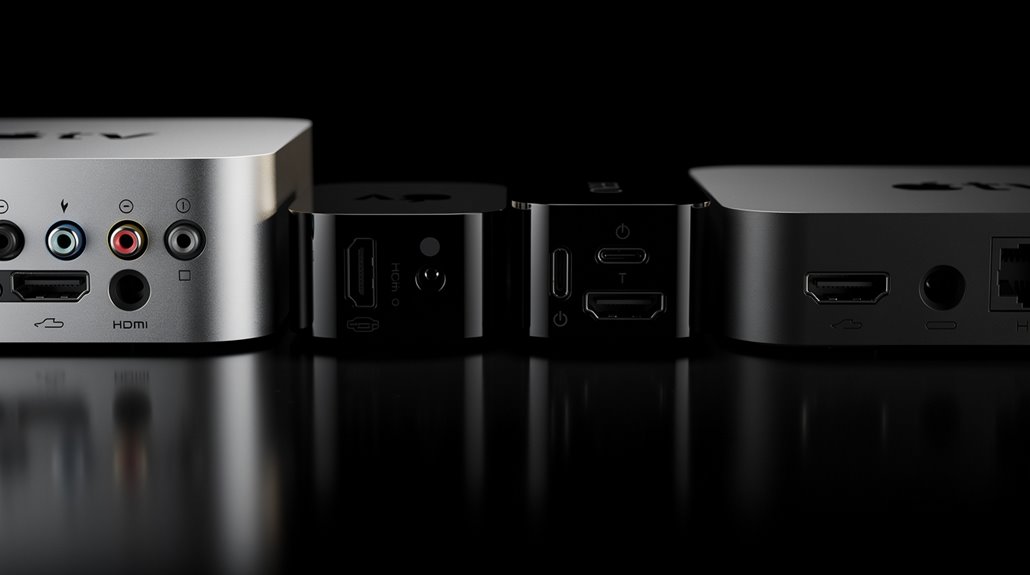
Apple has masterfully transformed identifying your Apple TV into a Kafkaesque ordeal, stripping away any intuitive hints. If you’re lucky, the model number—ranging from the first-gen A1218 silver relic to the inscrutably black A1842 4K model—lurks beneath the device or within Settings > General > About. Ports offer scant salvation: 1st gen flaunted component inputs, 4th gen wields USB-C, and the 4K opts out of USB entirely. This labyrinthine charade guarantees only the most masochistic survive; persistent inquisition will reveal more.
How delightfully inscrutable has the once-simple Apple TV become, morphing from a silver, clownish box into a black enigma that mocks users with its baffling port configurations and cryptic model numbers? What began as a cheerful, silvery-white rectangle flaunting component video inputs has descended into a Kafkaesque labyrinth of HDMI versions, USB types, and optical audio OUTPUTs that seem designed to frustrate rather than clarify.
Once simple and cheerful, the Apple TV has twisted into a perplexing black box of baffling ports and cryptic codes.
The 1st generation Apple TV, identifiable by its silver chassis and component video ports, at least had the decency to wear its quirks openly, while the subsequent 2nd and 3rd generations shrouded themselves in black, featuring the obligatory Micro-USB port and optical audio output like secret club badges—barely distinguishable from each other except to those with an affinity for numbing palpitations. Checking the model number found on the bottom of the device or in the Settings menu is a reliable way to differentiate between these two generations. Additionally, each generation has a unique port configuration that can assist in identification if model numbers are unclear.
Fast forward to the “HD” (read: 4th generation) model, which boasts a USB-C port perched awkwardly above its HDMI input, a subtle yet lavish bid for sophistication amid an otherwise bleak hardware landscape, supporting a modest 720p or 1080p resolution that screams “almost modern.”
Meanwhile, the Apple TV 4K increments the charade by obliterating USB ports altogether, flaunting HDMI 2.0a to handle 2160p and HDR formats—presumably to make you squint harder at a phishing expedition of rear-panel ports that offer nothing but mute contempt. This model also incorporates advanced connectivity options such as Wi-Fi (802.11a/b/g/n/ac) and Bluetooth 5.0.
If your ambitions stretch beyond guesswork, Apple obligingly stamps model numbers on the device’s humble underbelly, starting with the decorous “A” followed by four digits—A1218 for the silver relic of yore, meandering through black boxes marked A1378 and A1427/A1469, until reaching the perplexing A1625 and A1842 for the HD and 4K successors.
Verification via tvOS— Settings > General > About > Model—is a digital salvation, for when physical inspection becomes a cruel joke against your patience.
Physical appearance, once a reliable deception, also falters: the 1st generation’s clear plastic and white remote yielded to black boxes and aluminum clickers, only for Siri Remotes to toggle between black and aluminum in a petty cosmetic shrug that says “You’ll never really know.”
Ethernet ports stubbornly refuse to discriminate, ensnaring all models in uniform banality.
Identifying one’s Apple TV is consequently an exercise in futility, a modern ritual of deduction faced with sly design, managerial overlords who confuse rather than enlighten, and a product line that has turned port inspection into performance art worthy of Sisyphean myth.
The only certainty being that the device on hand will neither admit its identity without a fight nor alleviate the existential malaise it fosters in its beleaguered owners.
Frequently Asked Questions
Can I Use My Apple TV to Play Ios Games?
Apple TV cannot natively run iOS games, as it uses tvOS with a separate app store. However, users can stream iOS games via AirPlay or play tvOS-optimized game versions using compatible controllers and Apple Arcade.
How Do I Reset My Apple TV to Factory Settings?
To reset an Apple TV, navigate to Settings > System > Reset for 4K/HD models, or Settings > General > Reset for older versions. Choose either a standard reset or reset with update, and confirm the process to factory restore.
What Streaming Apps Are Compatible With Apple TV?
Apple TV supports major streaming apps like Netflix, Amazon Prime Video, Disney+, Max, Hulu, Peacock, AMC+, and Tubi. Music and media apps such as Spotify, Pandora, YouTube, Plex, and Infuse also provide extensive entertainment options.
Can Apple TV Connect to Bluetooth Headphones?
Apple TV 4th generation and later can connect directly to Bluetooth headphones, including AirPods and Beats. Earlier models only recognize Bluetooth keyboards. Only Apple TV 4K supports dual audio sharing with Apple-branded headphones.
Does Apple TV Support 4K HDR Video Playback?
Apple TV models from 2017 onward support 4K HDR video playback, including HDR10 and Dolby Vision. The 2021 and 2022 versions add high-framerate HDR and HDR10+ support, enhancing video quality and performance capabilities.
References
- https://www.maketecheasier.com/identify-apple-tv-model/
- https://www.youtube.com/watch?v=-Ldm0EyUSWM
- https://www.idownloadblog.com/2019/06/14/identify-apple-tv-model/
- https://www.businessinsider.com/reference/what-generation-is-my-apple-tv
- https://www.coolblue.nl/en/advice/how-do-i-see-which-apple-tv-i-have.html
- https://www.youtube.com/watch?v=lgIpxC2VpQw
- https://support.apple.com/en-us/101605
- https://support.apple.com/guide/tv/which-apple-tv-model-do-i-have-atvbac878c90/tvos
- https://smart.dhgate.com/how-to-easily-identify-your-apple-tv-model-a-step-by-step-guide/
- https://www.macrumors.com/guide/apple-tv-generations-compared/